🧬 IGV De Novo Variant Review

An HPC-deployable web service for browsing, reviewing, and curating de novo variants in trio sequencing data. Built on igv.js, designed for clinical genomics and research workflows.

🔬 Trio Alignment Viewing ✅ Manual Curation 📊 XLSX Export 🐳 Docker & Singularity ⌨️ Keyboard Shortcuts
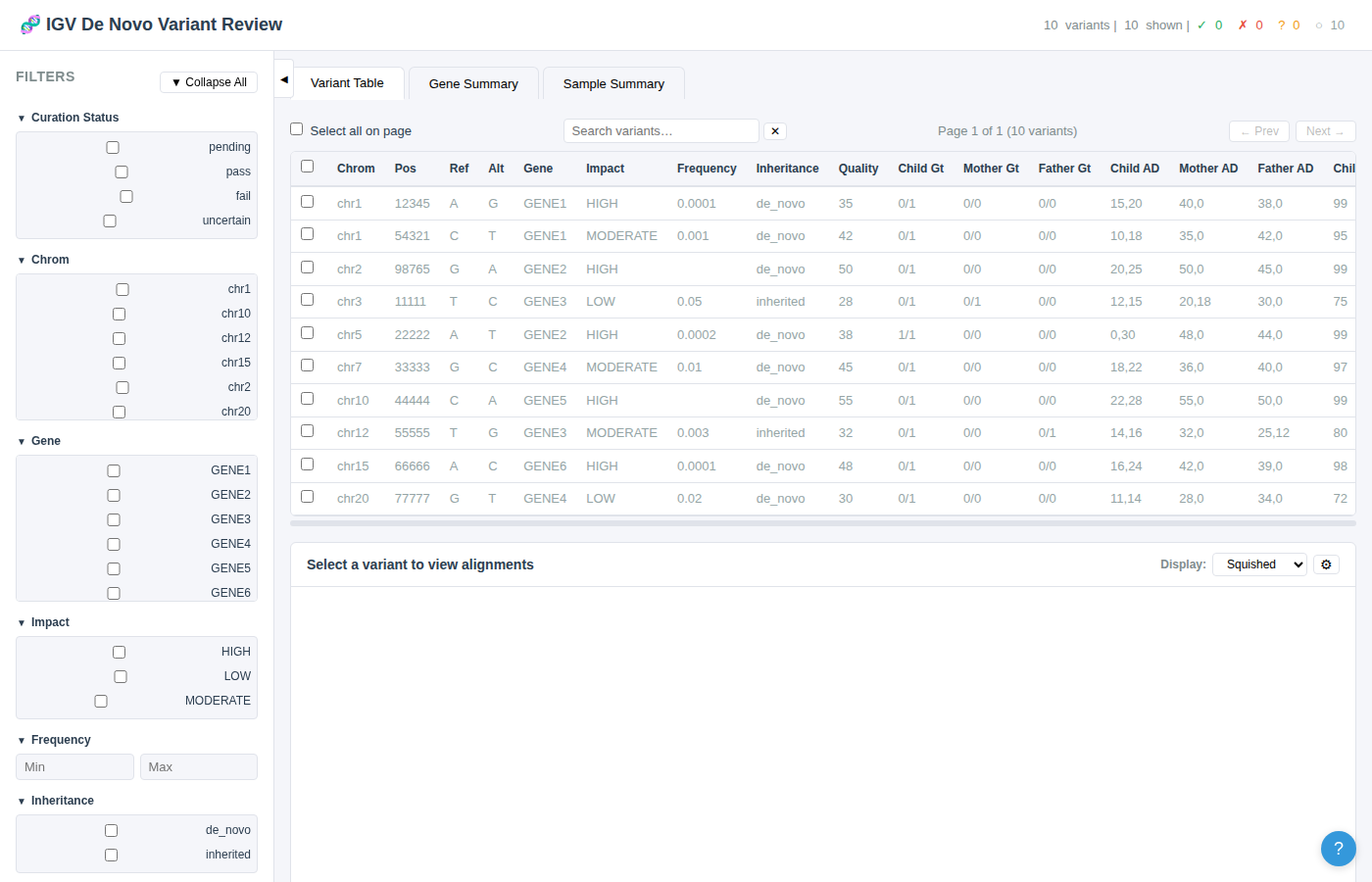
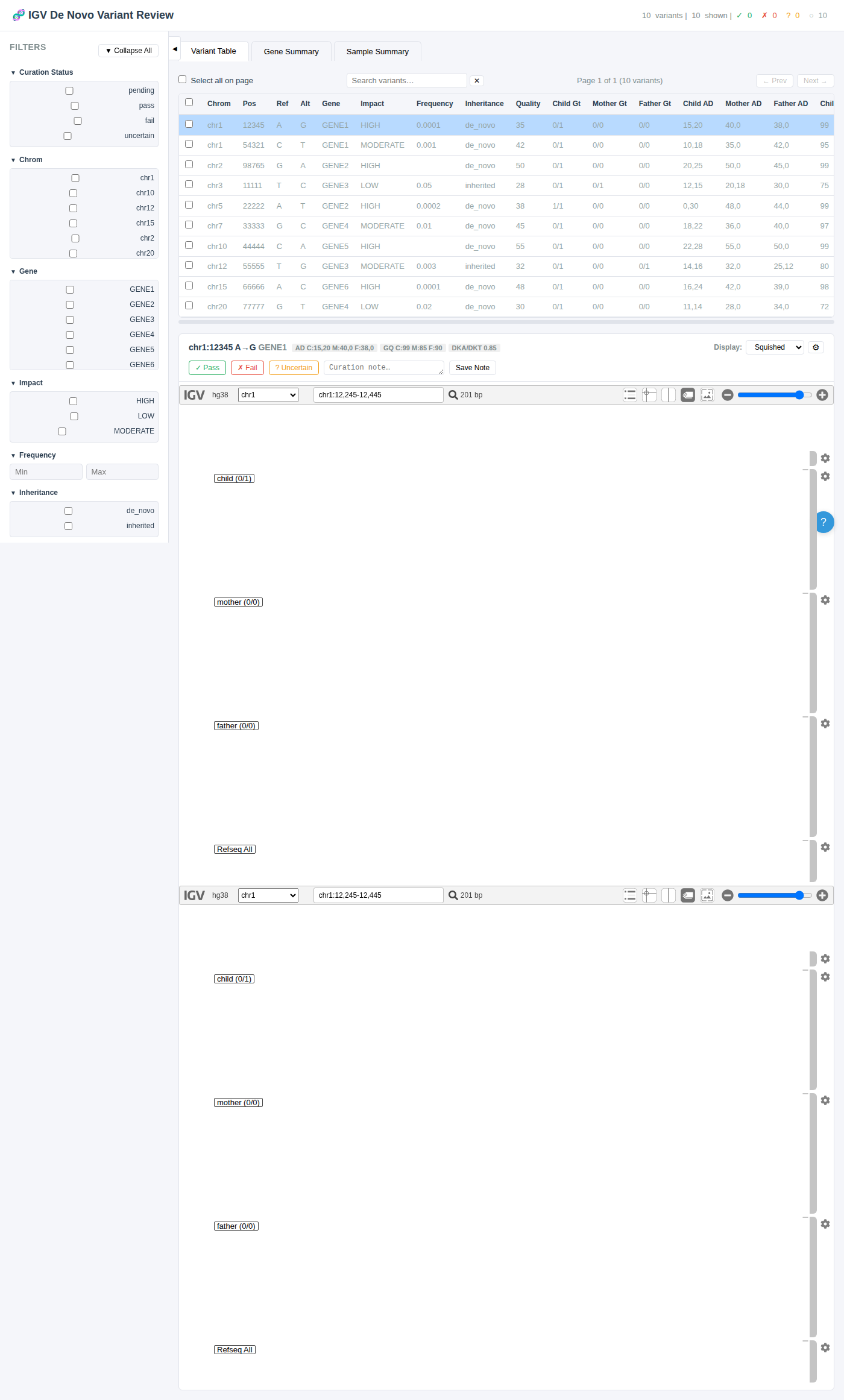
Full application overview showing the variant table, filter sidebar, and IGV viewer area
Full application overview – The variant table with filter sidebar (left), tab navigation, and integrated IGV genome viewer below.

Features

Everything you need to review, curate, and export de novo variant calls from trio sequencing data.

📋

Variant Browsing

Paginated, sortable table of variants with all annotations. Click any column header to sort ascending or descending.

🔍

Dynamic Filtering

Filter on any annotation column – gene, impact, frequency, inheritance, curation status. Checkbox groups for categorical values, range sliders for numeric fields.

🧬

IGV Alignment Viewer

Click a variant to load child / mother / father alignment tracks directly in the browser at the variant position. Supports BAM, CRAM, and VCF files.

Manual Curation

Mark variants as Pass Fail Uncertain with free-text notes. Curation is persisted to disk using stable genomic-coordinate keys.

🧪

Gene & Sample Summary

Post-filtering summaries showing genes with multiple variants, per-sample curation counts, and cohort-level statistics.

📊

Publication-Quality Export

Export filtered + curated variants as TSV or styled XLSX workbooks with IGV screenshot tabs and cross-sheet hyperlinks.

🔬

Sample QC Integration

Load VerifyBamID freemix or other QC metrics to display color-coded warnings for contaminated or low-coverage samples.

⌨️

Keyboard Shortcuts

Navigate variants, curate, and toggle UI elements entirely from the keyboard for high-throughput review sessions.

🐳

HPC Deployment

Dockerized for portability. Convert to Singularity/Apptainer SIF for HPC clusters. Run via SLURM with port forwarding.

🚀 Quick Start

Get up and running in under 5 minutes.

Prerequisites

Node.js 18+ is required. On HPC clusters, you can use Docker/Singularity instead (see Deployment).

Installation & Launch

# 1. Clone the repository
git clone https://github.com/jlanej/igv.js.git
cd igv.js

# 2. Build igv.js (from the repo root – only needed once)
npm install
npm run build

# 3. Install server dependencies
cd server
npm install

# 4. Start the server with your data
node server.js \
  --variants /path/to/your/variants.tsv \
  --data-dir /path/to/bam_cram_files \
  --sample-qc /path/to/sample_qc.tsv \
  --genome hg38 \
  --port 3000

# 5. Open in your browser
#    http://127.0.0.1:3000

Try with Example Data

The server includes example data for a quick demo (no alignment files needed – the table and filtering still work):

cd server
node server.js
# Open http://127.0.0.1:3000

CLI Options

Flag Default Description
--variantsexample_data/variants.tsvPath to variant TSV file
--data-direxample_data/Directory containing BAM/CRAM alignment files
--genomehg38Reference genome for igv.js
--port3000HTTP port to listen on
--host127.0.0.1Bind address (use 0.0.0.0 in containers)
--curation-file<variants>.curation.jsonCuration persistence file
--sample-qc(none)Path to sample QC TSV file
--vcf(none)Path to global VCF file for variant tracks
--log-levelinfoLog verbosity: debug, info, warn, error

📋 Variant Table

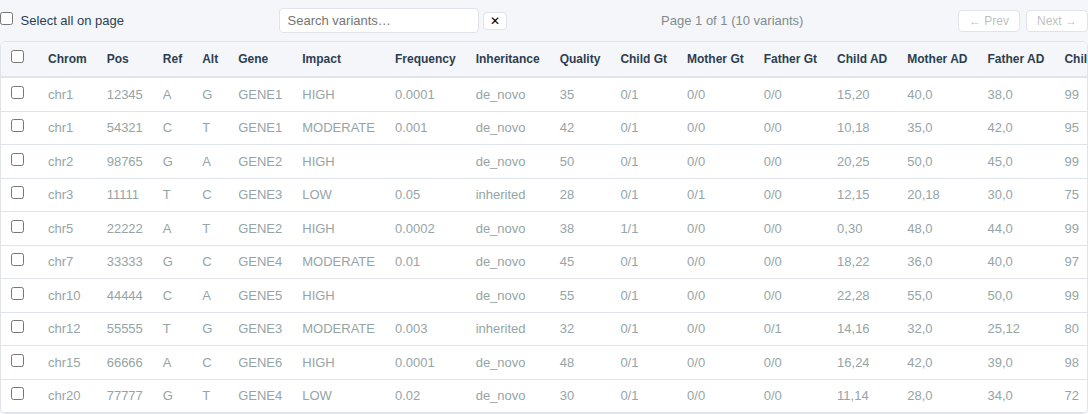
The main view for browsing and reviewing variants. All annotation columns from your TSV are displayed and sortable.

Variant table showing 10 rows with sortable columns, pagination, search, and curation status badges
Variant table – Sortable columns, search bar, pagination controls, and color-coded curation status badges.

Key Capabilities

Stats Bar

The header bar displays real-time statistics: total variant count, number currently shown (after filtering), and per-status curation tallies. These counts reflect all variants, not just the current page.

🔍 Dynamic Filtering

Filter variants using any combination of annotation columns. Filters are applied server-side for fast response on large datasets.

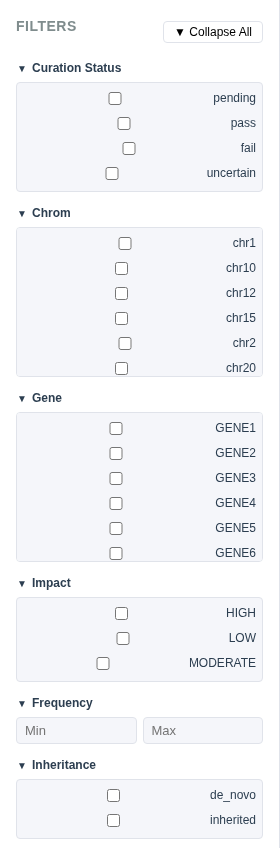
Filter sidebar showing gene checkboxes, impact checkboxes, frequency range inputs, and curation status filters
Filter panel – Checkbox groups, range inputs, and quick curation actions.

Filter Types

  • Checkbox groups – For categorical columns with ≤10 unique values (e.g., gene, impact, inheritance, curation status). Check one or more values to include.
  • Dropdown selectors – For categorical columns with >10 unique values. Select one or more from a dropdown menu.
  • Range inputs – For numeric columns (e.g., frequency, quality). Set minimum and/or maximum values.

Filter Actions

  • Apply Filters – Submit all current filter selections to the server and refresh the variant table.
  • Clear All – Reset all filters to show all variants.
  • 💾 Save Filters – Save the current filter configuration for later reuse.
  • 📂 Load Filters – Restore a previously saved filter configuration.

Collapsible Groups

Each filter group can be collapsed or expanded individually by clicking the header. Use the ▼ Collapse All / ▲ Expand All button to toggle all groups at once.

Collapsible Sidebar

The entire filter sidebar can be collapsed using the ◀ toggle button or the keyboard shortcut Ctrl+B to maximize table and IGV viewer space.
Curation Workflow

A streamlined workflow for reviewing and curating variants, designed for high-throughput sessions.

Curation workflow showing an active variant row highlighted in blue, IGV viewer, curation buttons, and note field
Curation in action – An active variant is highlighted, with curation buttons and note field in the IGV header.

Step-by-Step Workflow

  1. Filter variants

    Use the sidebar controls to narrow down to variants of interest (e.g., HIGH impact, de novo inheritance, low frequency).

  2. Click a variant row

    The row highlights in blue and the IGV viewer loads the trio alignment tracks (child, mother, father) at the variant position.

  3. Review trio alignments

    Examine read support in the child versus parents. Toggle display mode (Squished / Expanded / Collapsed) for different views.

  4. Curate the variant

    Click ✓ Pass, ✗ Fail, or ? Uncertain. The table row updates its color immediately.

  5. Add a note (optional)

    Type a free-text note in the curation note field. Use the "Previous notes…" dropdown to reuse common notes from prior curations.

  6. Advance to the next variant

    Press j to jump to the next uncurated variant, or use P / F / U to curate and advance in one keystroke.

  7. Export results

    When done, export your curated variant set as TSV or publication-quality XLSX.

Batch Curation

Select multiple variant rows using the checkboxes, then use the Quick Curation buttons in the sidebar to apply a curation status to all selected variants at once. This is useful for quickly failing a group of known artifacts.

Sample-Level Curation

The Sample Summary tab includes Flag Sample buttons ( ?) that let you curate all variants for an entire sample in one click.

Gene-Level Curation

Similarly, the Gene Summary tab includes Flag Gene buttons to curate all variants within a specific gene at once.

Curation Persistence

Stable keys: Curation state is saved to a JSON file using chrom:pos:ref:alt coordinate keys (with optional trio_id / sample_id suffix for multi-sample datasets). This means curation data survives changes to the variant list, row reordering, and additions/removals across sessions.

🧬 IGV Alignment Viewer

An embedded igv.js genome browser for reviewing trio alignment data directly in the web interface.

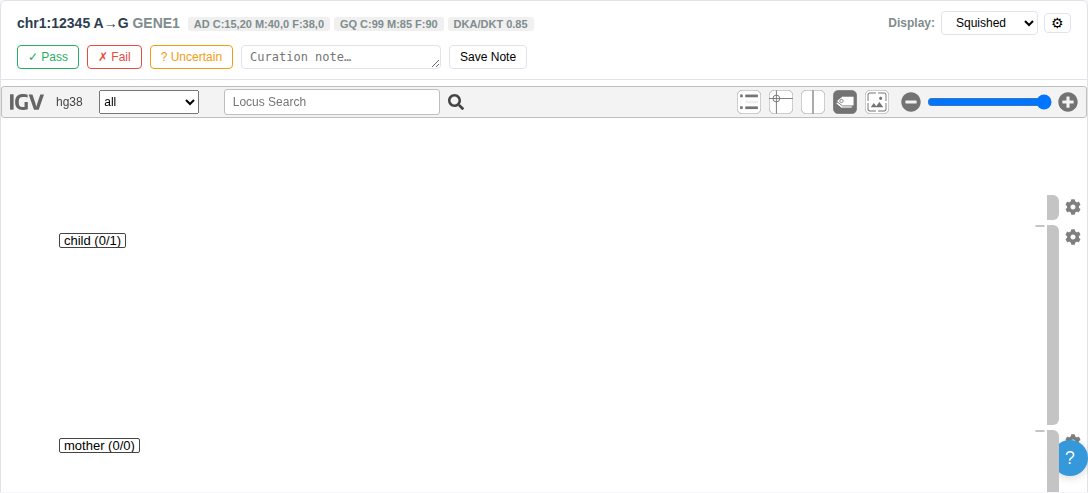
IGV viewer showing variant metadata, curation buttons, genome viewer placeholder, and track status indicators
IGV viewer section – Variant metadata header, curation controls, genome viewer, display mode selector, and track load status.

Viewer Components

VCF Track Support

Optionally load VCF tracks alongside alignments. VCF files can be specified:

Shared multi-sample VCF files are de-duplicated automatically and loaded as a single track annotated with all sample roles.

Resizable Layout

A drag handle between the variant table and the IGV viewer allows you to resize the table height to allocate more or less screen space to the genome browser.

🧪 Gene Summary

Aggregate view of variants by gene, reflecting current filters. Useful for identifying genes with multiple candidate variants.

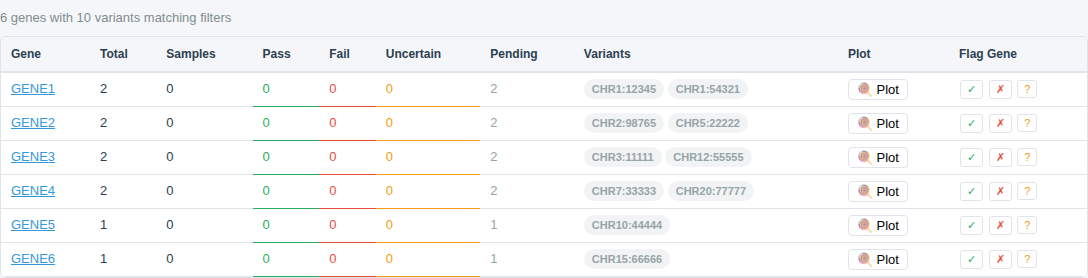
Gene summary table showing genes with variant counts, sample counts, curation breakdowns, and Flag Gene buttons
Gene Summary tab – One row per gene with total variant count, sample count, per-status curation breakdown, and gene-level curation buttons.

Columns

ColumnDescription
GeneGene symbol (clickable – filters the variant table to that gene)
TotalNumber of variants in this gene passing current filters
SamplesNumber of distinct samples/trios with variants in this gene
Pass / Fail / Uncertain / PendingPer-status curation counts for this gene
VariantsComma-separated list of variant positions
Flag Gene ? buttons to curate all variants in the gene at once

📈 Sample Summary

Per-sample variant counts and cohort-level statistics, broken down by impact and frequency thresholds.

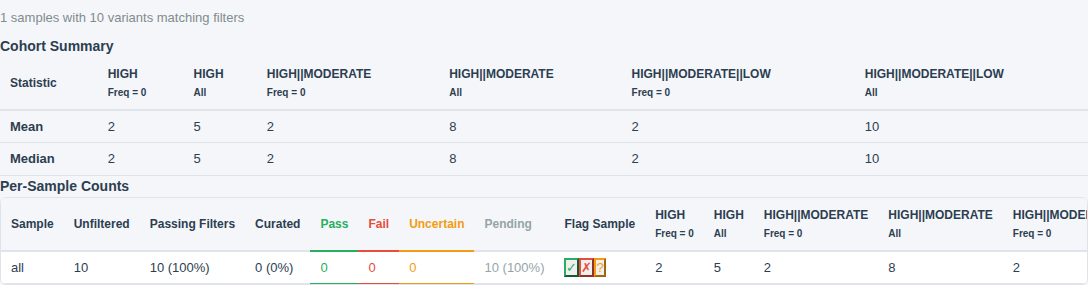
Sample summary showing cohort statistics table and per-sample variant counts table
Sample Summary tab – Cohort-level mean/median/SD (top) and per-sample variant counts with curation breakdown (bottom).

Cohort Summary

Displays mean, median, and standard deviation of variant counts across all samples, stratified by impact level and frequency threshold. This helps identify samples with unusually high or low variant burdens.

Per-Sample Counts

Each row shows one sample/trio with:

🔬 Sample QC

Quality control metrics integration for flagging problematic samples before curation.

Load a per-sample QC file with --sample-qc <path> to enable QC integration. The QC file is a tab-separated file with columns for trio_id, role (proband/mother/father), sample_id, and any number of numeric QC metrics.

Freemix Thresholds

The freemix column (from VerifyBamID) is automatically classified:

StatusFreemix RangeInterpretation
Pass≤ 0.01 (≤1%)Clean – no special handling needed
Warn0.01–0.03Caution – apply stricter DNM evidence filters
Fail0.03–0.05Exclude sample/trio from DNM detection
CRITICAL≥ 0.05 (≥5%)Hard fail – results are usually unreliable

UI Integration

Example QC File

trio_id	role	sample_id	freemix	mean_coverage
TRIO_A	proband	SAMPLE_001	0.005	35.2
TRIO_A	mother	SAMPLE_002	0.012	30.1
TRIO_A	father	SAMPLE_003	0.002	32.5
TRIO_B	proband	SAMPLE_004	0.045	28.3
TRIO_B	mother	SAMPLE_005	0.008	31.7
TRIO_B	father	SAMPLE_006	0.003	29.8

📊 Export

Download your curated variant data in multiple formats for downstream analysis and publication.

📥 TSV Export

Downloads the currently filtered and curated variants as a tab-separated text file. Includes all original columns plus curation_status and curation_note columns appended.

The export respects the current filter settings, so you can export subsets (e.g., only passing variants, only HIGH-impact variants).

📊 XLSX Export

Generates a publication-ready Excel workbook with multiple sheets:

  • Variants – Styled table with auto-filters, frozen header, and full-row coloring by curation status
  • Per-variant screenshot tabs – One worksheet per variant with the IGV alignment view embedded as a PNG image
  • Cross-sheet hyperlinks – Each variant row includes a "📷 View" link to its screenshot tab
  • Gene Summary – Gene-level aggregation sheet
  • Sample Summary – Per-sample curation counts with cohort statistics
  • Applied Filters – Record of which filters were active during export
  • Sample QC – QC metrics sheet (if QC data was loaded)
Progress tracking: XLSX export shows a progress bar in the sidebar as it captures IGV screenshots for each variant. For large variant sets, this can take several minutes.

⌨️ Keyboard Shortcuts

Navigate and curate entirely from the keyboard for efficient high-throughput review sessions.

ActionKey
Next uncurated variantj or
Previous uncurated variantk or
Mark as Passp
Mark as Failf
Mark as Uncertainu
Pass & advance to nextP (Shift+p)
Fail & advance to nextF (Shift+f)
Uncertain & advance to nextU (Shift+u)
Toggle keyboard shortcuts help?
Toggle filter sidebarCtrl+B

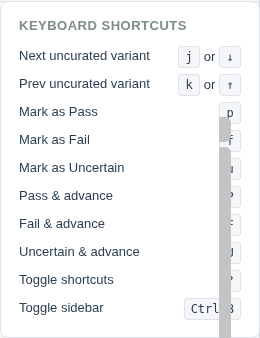
Press ? at any time to display the shortcuts overlay in the bottom-right corner of the screen.

Keyboard shortcuts overlay panel showing all available shortcuts
Keyboard shortcuts panel – Press ? to toggle.

📄 Input File Format

The server reads a tab-separated variant file with a header row. Four columns are required; all others are auto-detected and made filterable.

Required Columns

ColumnDescription
chromChromosome (e.g., chr1)
pos1-based genomic position
refReference allele
altAlternate allele

Recommended Columns

ColumnDescription
geneGene symbol – enables the Gene Summary tab
impactVariant impact (HIGH / MODERATE / LOW / MODIFIER)
frequencyPopulation allele frequency
inheritanceInheritance pattern (de_novo / inherited / unknown)
qualityVariant quality score
child_gt, mother_gt, father_gtGenotypes (e.g., 0/1)
child_file, mother_file, father_filePaths to BAM/CRAM alignment files (relative to --data-dir)
child_index, mother_index, father_indexPaths to alignment index files (.bai/.crai) – optional if co-located
trio_id / sample_idIdentifiers for multi-sample datasets, used for stable curation keys and QC linking

Per-Trio VCF Columns

ColumnDescription
child_vcf, mother_vcf, father_vcfPaths to VCF files (.vcf.gz)
child_vcf_index, mother_vcf_index, father_vcf_indexPaths to VCF index files (.vcf.gz.tbi)
child_vcf_id, mother_vcf_id, father_vcf_idSample IDs within multi-sample VCF files

Additional columns (e.g., cadd_score, clinvar, gnomad_af) are automatically displayed in the variant table and made available as filter options.

Alignment File Paths

🐳 HPC Deployment

Deploy on HPC clusters using Docker, Singularity/Apptainer, or native Node.js.

Docker / Singularity (Recommended)

Most HPC clusters don't have Node.js. Build a Docker image and convert to a Singularity SIF:

# Pull pre-built image from GitHub Container Registry
docker pull ghcr.io/jlanej/igv-variant-review:latest

# Or build locally from the repo root
docker build -t igv-variant-review .

# Convert to Singularity SIF
singularity build igv-variant-review.sif \
  docker://ghcr.io/jlanej/igv-variant-review:latest

Run with Singularity

singularity run \
  --bind /scratch/project/alignments:/data \
  --bind /scratch/project/denovo_variants.tsv:/variants.tsv \
  --bind /scratch/project/curation.json:/curation.json \
  igv-variant-review.sif \
  --variants /variants.tsv \
  --data-dir /data \
  --curation-file /curation.json \
  --port 8080

# Open browser: http://127.0.0.1:8080

SLURM Job Script

#!/bin/bash
#SBATCH --job-name=igv-review
#SBATCH --time=8:00:00
#SBATCH --mem=4G

singularity run \
  --bind /scratch/project/alignments:/data \
  --bind /scratch/project/denovo_variants.tsv:/variants.tsv \
  igv-variant-review.sif \
  --variants /variants.tsv \
  --data-dir /data \
  --port 3000

# Forward the port from a login node:
# ssh -L 3000:$SLURMD_NODENAME:3000 login-node

Native Node.js

If Node.js is available on your cluster (via module load or otherwise):

module load nodejs

cd /path/to/igv.js/server
npm install

node server.js \
  --variants /scratch/project/denovo_variants.tsv \
  --data-dir /scratch/project/alignments/ \
  --port 8080

# Open Firefox/Chrome: http://127.0.0.1:8080

Port Forwarding

When running on a remote compute node, forward the port to your local machine:

# From your local terminal:
ssh -L 3000:compute-node:3000 login-node

# Then open http://localhost:3000 in your local browser

🔌 REST API

The server exposes a RESTful API for programmatic access. All endpoints return JSON.

MethodEndpointDescription
GET/api/configServer configuration, column list, and total variant count
GET/api/variantsPaginated, filterable, sortable variant list with curation status
GET/api/filtersAvailable filter options (categorical values, numeric ranges) for each column
GET/api/summaryGene-level aggregation of current filtered variants
GET/api/sample-summaryPer-sample variant counts and cohort statistics
GET/api/sample-qcSample QC metrics (if loaded via --sample-qc)
PUT/api/curate/:idSet curation status and note for a single variant
PUT/api/curate/geneCurate all variants in a gene at once
PUT/api/curate/sampleCurate all variants for a sample at once
POST/api/export/xlsxGenerate and download a styled XLSX workbook

Variant Query Parameters

The /api/variants endpoint supports the following query parameters:

ParameterExampleDescription
page1Page number (1-based)
perPage50Results per page
sortgeneColumn to sort by
orderascSort order (asc or desc)
searchBRCACase-insensitive substring search across all columns
filter_<column>filter_impact=HIGH,MODERATEFilter by categorical column values (comma-separated)
<column>_minquality_min=30Filter by minimum numeric value
<column>_maxfrequency_max=0.01Filter by maximum numeric value

🏗️ Architecture

A lightweight Express server with an in-memory variant store and a single-page web UI.

igv.js/
├── server/
│   ├── server.js              # Express server & REST API
│   ├── logger.js              # Leveled logger with timestamps
│   ├── package.json           # Server dependencies
│   ├── public/
│   │   ├── index.html         # Web UI (single page)
│   │   ├── app.js             # Client-side application (~1000 lines)
│   │   └── styles.css         # Responsive styling
│   ├── example_data/
│   │   ├── variants.tsv       # Example variant file (10 variants)
│   │   └── sample_qc.tsv     # Example QC file
│   └── test/
│       └── server.test.js     # Integration tests (Mocha/Chai/Supertest)
├── js/                        # Core igv.js source
├── dist/                      # Built igv.js library
├── Dockerfile                 # Multi-stage Docker build
└── docs/
    └── index.html             # This documentation page

The server loads the variant TSV into memory at startup, serves a REST API for filtering, sorting, and curation, and provides a static file server for the web UI. The client-side application fetches data from the API and renders the UI dynamically. Curation state is persisted to a JSON file on disk.